How we calculate the score
The score is a weighted average mapped onto a 0–10 scale. Critical parameters such as performance and TTFB carry the most weight, while smaller signals contribute proportionally. Here is how the three result bands read:
0 – 3.5 · Slow performance
Slow performance for a Magento storefront. Significant backend and frontend optimization is needed for better speed and user experience.
3.5 – 8.5 · Average performance
An average store. Not bad — but there is clear room to push speed and stability further.
Above 8.5 · Super fast
An excellent-performing Magento store. It is optimized and ready to deliver a top-notch experience.
Parameters & weights
Each parameter is mapped to a 0–10 value, multiplied by its weight, summed, and divided by the total of all weights — keeping the final composite score inside a standardized 0–10 range. Weights below are loaded live from the scanner.
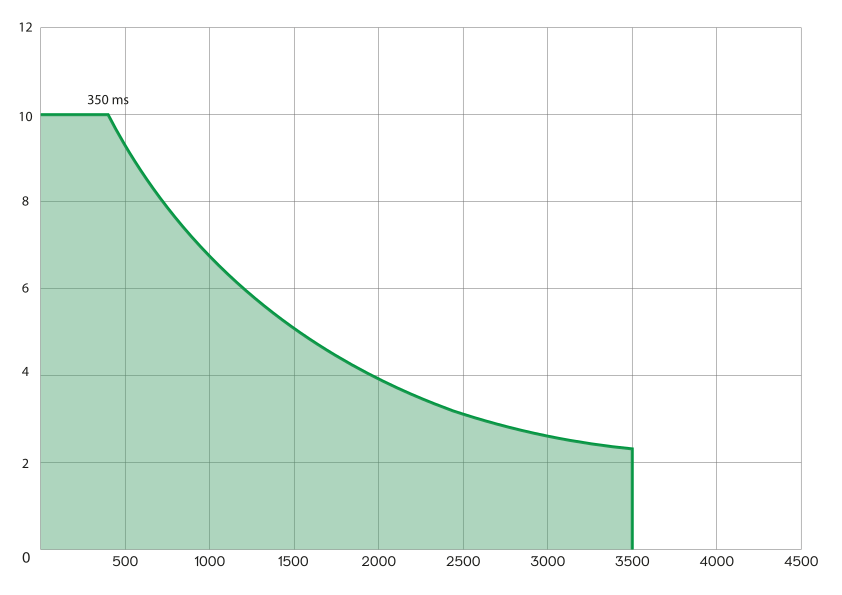
TTFB scoring curve
Time To First Byte is mapped onto the 0–10 range. Fast responses earn full marks; very slow responses score zero. The score follows the curve below — full points up to 350 ms, decaying to 0 above 3500 ms.